

Pre-Card Entry & Post-Processing Integration Point
Overview
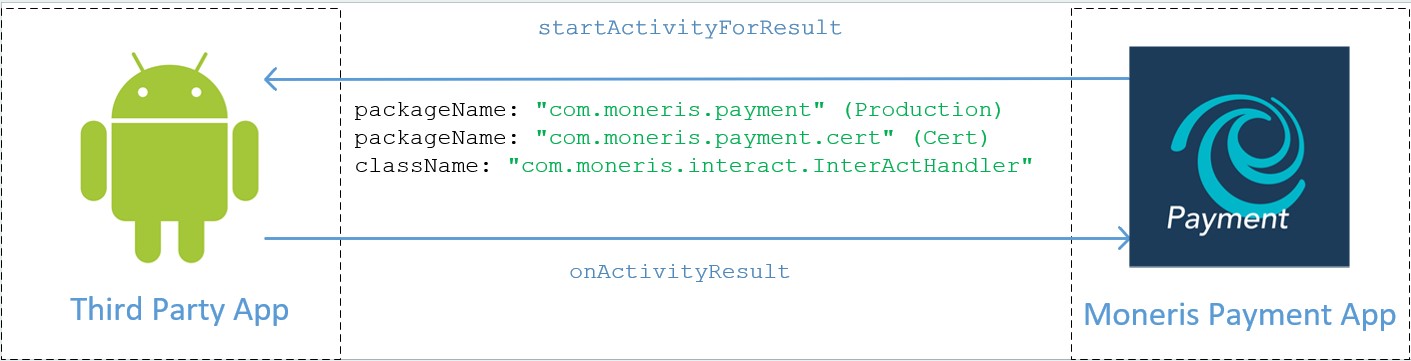
These hooks will be triggered via Activity Intents.
In the intent package, EXTRA_JSON_REQUEST value will be included following the JSON format (Pre-Card Entry / Post Processing).
By calling getStringExtra on the incoming intent in the target activity, the string value of the JSON can be retrieved.
String jsonRequest = getIntent().getStringExtra(EXTRA_JSON_REQUEST);In the AndroidManifest, please include the intent filters for the Activity you’d like to display on incoming hook. It would look like below:
<activity>
    android:name=".MainActivity"
    android:exported="true">
   …
    <intent-filter>
        <action android:name="com.moneris.hooks.PreCardEntry" />
        <category android:name="android.intent.category.DEFAULT" />
    </intent-filter>
    <intent-filter>
        <action android:name="com.moneris.hooks.PostProcessing" />
        <category android:name="android.intent.category.DEFAULT" />
    </intent-filter>
</activity>
To send a response back, the JSON string for the response should be put into a result intent with EXTRA_JSON_RESPONSE string extra value. This would look like this in an Activity:
Intent resultIntent = new Intent();
String resultJson = “{
   "apiVersion": "3.0",
   "correlationId": "example_correlationId",
   "responseDateTime": "2025-12-31T23:59:60Z",
   "action": "POST_PROCESSING",
   "status": "example_status"
}”
resultIntent.putExtra(EXTRA_JSON_RESPONSE, resultJson);
setResult(RESULT_OK, resultIntent);
finish();
Updated 5 months ago
Did this page help you?